NetSuite Data Migration Best Practices
A successful NetSuite implementation starts with successful data migration. If your legacy systems contain duplicate, incomplete, or inaccurate data, moving it into a new ERP system will only carry those problems forward. Without a structured migration process, organizations risk delays, poor data quality, and costly rework after go-live.
NetSuite data migration involves extracting, cleansing, validating, and transferring data into your new NetSuite ERP environment.
But migration isn’t easy. According to Panorama Consulting Group's 2026 ERP Report, more than a quarter of organizations exceeded their project budgets. Additional technology needs (caused by underestimating data migration complexity, in many cases) are cited as the leading cause.
This guide covers the best practices that help organizations protect data integrity and deliver a smoother ERP migration.
What Is NetSuite Data Migration and Why Does It Matter?
NetSuite data migration is the process of moving data from legacy systems into a new NetSuite ERP environment. The goal is to migrate accurate, complete, and usable data that supports your ERP implementation from day one.
Most migration projects include:
- Master data: Customer records, vendors, items, chart of accounts, and other core business information.
- Transactional data: Sales orders, purchase orders, invoices, payments, and open balances.
- Historical data: Prior financial data, historical transactions, trial balance information, and customer histories needed for reporting, audits, and compliance.
A successful migration process also requires data mapping, data cleansing, data transformation, and data validation to make sure records align with NetSuite's data models and validation rules. Whether you're using CSV import templates, NetSuite's native tools, or ETL tools for mass data migration, careful data preparation is essential to protect data integrity.
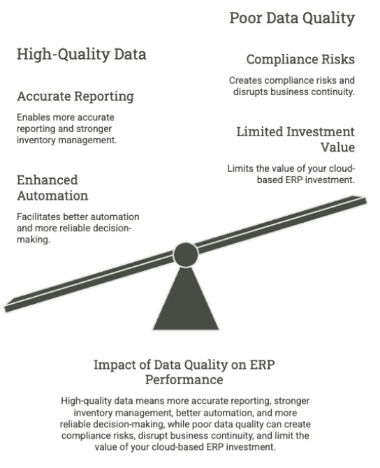
High-quality data means more accurate reporting, stronger inventory management, better automation, and more reliable decision-making, while poor data quality can create compliance risks, disrupt business continuity, and limit the value of your cloud-based ERP investment.
Oracle NetSuite's own walkthrough of its Data Migration Service shows exactly what the native tooling covers and where structured planning still determines the outcome:
The Main Stages of NetSuite Data Migration
While every ERP implementation is different, successful NetSuite data migration projects typically follow the same five-stage migration process. Completing each stage in the right order reduces risk, improves data quality, and helps keep your go-live date on schedule.
1. Assess and Plan the Migration
Start by identifying every data source that will feed your new NetSuite ERP system. Decide what data will be migrated, what should be archived, and what can be retiredaltogether. This is also the time to build your migration team (starting with NetSuite executives), define ownership, establish data governance, and set realistic timelines for migration execution.
2. Extract, Audit, and Prepare Data
Extract data from your legacy systems and perform a thorough data audit before moving anything into NetSuite. Identify duplicate customer records, incomplete financial data, outdated vendor relationships, and inconsistent formatting. Early data preparation makes the rest of the migration process significantly easier.
3. Cleanse, Transform, and Map Data
Next, perform data cleansing and data transformation to align your records with NetSuite's data models. Create detailed data mapping documents, apply data transformation rules, standardize formats, and prepare custom records for import. This is also where many organizations build transformation scripts or migration scripts to automate repetitive tasks.
This is important since over a quarter of organizations believe they lose more than $5 million annually due to poor data quality, with 7% reporting losses exceeding $25 million (same source as earlier).
4. Validate in a Sandbox Environment
Before production, run one or more test migrations in a NetSuite sandbox. Use data validation reports to verify record counts, trial balance totals, inventory values, and transactional data against your source systems. Resolving issues here is far less disruptive than fixing them after go-live.
5. Execute the Production Migration
With testing complete, execute the final data transfer using your chosen migration toolkit, NetSuite's native tools, CSV import functionality, or ETL tools. Follow a structured cutover planning process, create a full data backup, monitor the migration closely, and reconcile results before declaring the ERP migration complete.
10 NetSuite Data Migration Best Practices
The following best practices can reduce risk, improve data quality, and keep your ERP implementation on track from planning through go-live.
1. Define Your Migration Scope Before Moving Any Data
One of the biggest mistakes organizations make is trying to migrate everything from their legacy systems. Every record you move increases the time, cost, and difficulty of the migration process, so it's important to work out exactly what belongs in your new NetSuite ERP environment before any data transfer begins.
So, how much historical data should you migrate to NetSuite?
Open balances vs. full history
- Open balances are the live data your business needs to operate today: unpaid customer invoices, unpaid vendor bills, and current inventory on hand.
- Historical data is everything already closed out: paid invoices, shipped orders, completed transactions from prior periods.
Many organizations assume they need years of detailed transaction history in the new system, when in practice only open balances are required for day-to-day operations.
Migrating several years of detailed transactions means mapping every historical scenario, including edge cases like how refunds, credits, or adjustments were handled years ago, to NetSuite's current data model and validation rules.
All that can add meaningfully to total implementation cost and timeline, since every additional year of data means more reconciliation, more edge cases, and more opportunities for a discrepancy that has to be tracked down before go-live.
Our practical framework for deciding
Most organizations are better served by:
- Migrating current-year transactional detail and open balances into NetSuite directly
- Bringing in 5 to 7 years of summary trial balance data for audit and reporting continuity, rather than full transaction-level detail
- Archiving older, closed-out historical data in the legacy system (kept in read-only mode) or a low-cost data warehouse, where it remains accessible for audits without adding weight to the production ERP
This is also where a rollback and legacy-access plan pays off twice: keeping the old system available in read-only mode gives your team a reference point for validation immediately after go-live, and a place to look up older records without ever having migrated them.
Set this cutoff deliberately, ideally during the "Assess and Plan" stage. It’s much better than defaulting to "migrate everything" and discovering the cost partway through the project.
2. Build a Cross-Functional Migration Team
Every department that creates, owns, or relies on business data should be involved throughout the migration process. Finance validates financial data and trial balance accuracy, operations verifies inventory management records, procurement reviews vendor relationships, and sales confirms customer records and customer histories are complete.
Your migration team should establish clear ownership before migration execution begins. At a minimum, define who is responsible for:
- Approving data mapping and data transformation rules.
- Performing data validation after each test migration.
- Signing off on Master data and transactional data before production.
- Resolving issues discovered during testing or cutover planning.
This approach improves data quality while preventing decisions from becoming bottlenecks later in the ERP implementation. It also strengthens change management by ensuring each department understands how its data will be used in the new NetSuite ERP environment.
When business users help validate the migration, the result is higher data integrity and a smoother go-live.
3. Audit and Clean Your Data Before Migration
The quality of your NetSuite ERP will never exceed the quality of the data you migrate into it. Before you begin any data transfer, perform a comprehensive data audit to identify duplicate customer records, incomplete financial data, outdated vendor relationships, inconsistent formatting, and inaccurate Master data.
Focus your Data cleansing efforts on issues that will have the biggest operational impact after go-live, including:
- Removing duplicate customer records and vendors.
- Standardizing naming conventions, dates, and addresses.
- Correcting incomplete or inaccurate financial data.
- Eliminating obsolete inventory items and inactive records.
- Verifying that transactional data can be linked correctly to master data.
Data quality expert Thomas C. Redman has also warned that:
"Too many errors leak through, rearing their ugly heads later on and leading to larger mistakes, bad decisions, and angry customers."- Thomas C. Redman, Data Quality Should Be Everyone’s Job
Those downstream issues are far easier and far less expensive to prevent during data preparation than after your NetSuite data migration is complete.
4. Create Detailed Data Mapping Rules
Data mapping is one of the most important steps in the migration process because it determines how information from your legacy systems will fit into your new NetSuite ERP environment. Even small inconsistencies can trigger import failures, corrupt reports, or create data integrity issues that aren't discovered until after go-live.
Your data mapping documentation should define:
- Every source field and its corresponding NetSuite field.
- Required fields and validation rules for each record type.
- Data transformation rules needed to standardize formats.
- Relationships between master data, transactional data, and custom records.
- Any exceptions that require manual review instead of automated processing.
This documentation becomes the blueprint for the entire migration execution. It also makes testing far more efficient because every transformation can be traced back to an approved mapping decision.
Taking the time to build comprehensive mapping rules before importing data reduces rework, improves data quality, and gives your internal team a repeatable process for future migrations and system integrations.
5. Use the Right Migration Tools for Your Data
There's no single approach to NetSuite data migration. The best method depends on the volume of data you're moving, the number of legacy systems involved, and how much transformation is required before import.
The tools we recommend are:
- NetSuite's CSV Import Assistant handles most straightforward migrations well. It works directly within NetSuite, supports standard record types like customers, vendors, and items, and requires no additional licensing. For organizations with a single legacy system and relatively clean data, this is usually the fastest and least expensive path to a working import.
- SuiteScript becomes useful when the migration needs custom logic that CSV import can't handle: conditional field mapping, multi-step data transformations, or migrating custom records with complex relationships. This typically requires a NetSuite developer or implementation partner, since it involves writing and testing scripts. You won’t be filling out templates.
- iPaaS platforms like Boomi and Celigo are built for migrations involving multiple source systems, ongoing data synchronization, or integration needs that extend beyond the initial migration. Celigo in particular offers pre-built connectors for common source systems, which can reduce setup time for mid-market migrations. Boomi tends to suit larger, more complex integration landscapes where the migration is one piece of a broader systems architecture.
- Dedicated migration tools and specialist consultants make sense for large-scale, multi-system migrations where the data volume, number of legacy systems, or degree of customization exceeds what CSV import or a single iPaaS connector can reasonably handle.
For relatively straightforward migrations, NetSuite's native tools and CSV import functionality may be enough to load customer records, financial data, and other standard datasets. More complex ERP migration projects require ETL tools, migration scripts, transformation scripts, or a dedicated migration toolkit to automate repetitive tasks and manage large-scale data transformation.
As you evaluate your approach, consider:
- The volume of data being migrated.
- The number of source systems involved.
- Whether custom records require special handling.
- The complexity of your data transformation rules.
- How much manual intervention will be required during migration execution.
Automation can significantly reduce manual effort, but it isn't a substitute for thorough testing. Every automated workflow should still be validated to make sure records are imported accurately and relationships between datasets remain intact.
6. Run Multiple Test Migrations Before Touching Production
One successful test migration isn't enough to prove your implementation is ready for production. Experienced NetSuite implementation teams typically perform at least two or three complete migration cycles in a sandbox environment where they refine the process after each round until the results are consistent and repeatable.
Each test migration should answer critical questions before you move forward:
- Do record counts match the source data?
- Does the opening trial balance reconcile with the legacy system?
- Are customer records, vendors, and inventory imported correctly?
- Are any transactions referencing records that don't exist?
- Can the migration be completed within the planned cutover window?
Treat each test as a full rehearsal rather than a technical exercise. Time the migration execution, document every issue that arises, refine your data transformation rules, and repeat the process until your internal team is confident the results can be replicated under production conditions.
7. Validate with Reconciliation Reports (A Clean Import Log Doesn't Mean Clean Data)
An error-free import log simply confirms that the records were accepted by the system, but it doesn't confirm that the data is complete, accurate, or financially correct. Before approving the migration, perform a full reconciliation between your legacy systems and your new NetSuite ERP environment.
At a minimum, compare:
- Accounts receivable and accounts payable balances.
- Trial balance totals and key financial data.
- Inventory quantities and inventory values.
- Bank account balances.
- Customer records, vendor records, and open transactions.
Any discrepancies, no matter how small, should be investigated before moving to the next stage. Minor variances can be symptoms of larger issues with data mapping, data transformation, or missing records that become much more difficult to correct after go-live. Business stakeholders (not just IT) should also review and formally sign off on the results to confirm the data reflects real-world operations.
8. Define a Rollback Plan Before Production Cutover Begins
No matter how thoroughly you've tested your NetSuite data migration, every production cutover should include a documented rollback plan. If critical issues emerge during the first 24 to 48 hours after go-live, your team needs a clear process for restoring operations while problems are investigated and resolved.
Your rollback strategy should define:
- The conditions that would trigger a rollback.
- Who has the authority to make that decision.
- How data backup and system restoration will be performed.
- How employees, customers, and other stakeholders will be informed.
- How the legacy system will remain available in read-only mode for verification.
Keeping your legacy systems accessible through at least the first financial close also gives your internal team a reliable point of comparison while validating reports, financial data, and operational workflows in NetSuite.
9. Time Your Cutover to Avoid Peak Financial Periods
When you schedule your production cutover can be just as important as how you execute it. Migrating to NetSuite during month-end, quarter-end, or year-end increases risk because the teams responsible for validating the migration are also focused on closing the books. If issues arise, they have less time to investigate and resolve them before critical reporting deadlines.
Whenever possible, plan your go-live date:
- Mid-month is better than at month-end in our experience.
- Early in a fiscal period instead of during financial close.
- Outside major business or seasonal peaks.
- With enough time to complete post-migration validation before the next reporting cycle.
This approach gives your migration team more capacity to monitor the implementation, reconcile financial data, and address any unexpected issues without disrupting day-to-day operations. It also reduces pressure on finance teams, allowing them to focus on data validation instead of racing against reporting deadlines.
NetSuite implementation specialist Paul Giese also recommends making sure the current fiscal year's data (along with 5-7 years of summary trial balance data and 1 or 2 years of transactions) is available in NetSuite, particularly for organizations going live mid-year.
Having current-year financial data readily accessible simplifies audits, improves reporting continuity, and reduces the need to switch between systems during the first months after go-live.
10. Implement Data Governance from Day One
A successful NetSuite data migration doesn't end when the data is loaded. Without ongoing data governance, duplicate records return, naming conventions drift, required fields get bypassed, and data quality gradually deteriorates. The result is less reliable reporting, inconsistent processes, and growing distrust in the ERP system over time.
Establish governance policies as part of your implementation. This should include:
- Standardized procedures for creating and updating customer records, vendors, and other master data.
- Required field validation to improve data quality at the point of entry.
- Role-based permissions that limit who can create, edit, or delete critical records.
- Regular data audits to identify duplicate, incomplete, or inconsistent records.
- Clear ownership for maintaining data quality across business functions.
NetSuite provides built-in capabilities to support these efforts, including duplicate detection, required field configuration, saved searches, and audit trails. Taking advantage of these features can preserve data integrity long after the initial migration process is complete.
Migrating to NetSuite from QuickBooks, Sage, or a Legacy ERP
The system you're migrating from shapes which problems you're most likely to run into. A few of the most common source systems create predictable, specific challenges worth planning for in advance.
NetSuite Migration from QuickBooks
QuickBooks rarely enforces consistent naming or structure, which means customer and vendor records mostly exist as near-duplicates ("Acme Inc," "Acme, Inc.," "ACME INC") that need to be identified and merged before import. QuickBooks also has no native concept of multi-entity or multi-subsidiary structure, so organizations moving to NetSuite because they've outgrown QuickBooks usually need to design a chart of accounts and entity structure from scratch.
NetSuite Migration from Sage
Sage's chart of accounts and reporting logic don't map directly onto NetSuite's data model, which means account mapping needs deliberate attention instead of a straight field-to-field copy. Sage implementations also tend to carry more custom fields and reports than QuickBooks environments, which increases the data mapping and validation work required before go-live.
NetSuite Migration from a Legacy or Highly Customized ERP
Migrations from SAP or other on-premise systems typically involve:
- The most custom records
- The most non-standard workflows
- The largest volume of historical transactions
The biggest risk is assuming that years of customization and business logic will translate cleanly into NetSuite's structure. These migrations benefit most from the data dictionary and detailed mapping documentation described earlier in this guide, since institutional knowledge about why a legacy system was configured a certain way is usually the hardest thing to transfer.
Regardless of the source system, the same principle holds: don't assume your legacy data's structure is something to preserve; migration is a natural point to correct years of accumulated inconsistency.
Common Mistakes and Where NetSuite Migrations Break Down
Even organizations that follow a structured migration process can run into problems. In most cases, the issue is underestimating how quickly small decisions can compound into major implementation challenges.
These are some of the most common reasons NetSuite data migration projects fall behind schedule or fail to deliver the expected business value.
Treating Data Migration as an IT Project
Data migration affects every department, yet many organizations leave the entire process to IT. While the technical migration may succeed, the business data doesn't in many cases.
Finance may discover incorrect account mappings, operations may find inaccurate inventory records, and sales teams may uncover incomplete customer records after go-live. Business stakeholders should be involved throughout the project.
Underestimating the Time and Resources Required
Organizations frequently budget for software configuration but underestimate the effort needed to extract, cleanse, transform, and validate data. As the project progresses, the migration team becomes overwhelmed, testing gets compressed, and important validation steps are skipped to meet the go-live date.
Many organizations reach the migration phase only to discover they've significantly under-resourced the effort, forcing rushed imports or costly implementation delays.
Mapping Financial Data Incorrectly
One of the most expensive mistakes is assuming that account structures from legacy systems can simply be copied into NetSuite. Incorrect data mapping can affect financial statements, management reports, and operational dashboards long after implementation is complete.
Resolving these issues usually requires extensive investigation and manual corrections, which means it’s far more efficient to validate mappings before migration begins.
Skipping a Data Dictionary
Many migration projects rely on institutional knowledge instead of documentation. When field definitions, business rules, and data transformation decisions aren't documented, the project becomes dependent on a handful of individuals
An in-depth data dictionary gives you a single source of truth for the entire migration team, simplifies testing, and makes future system improvements much easier to manage.
Assuming Production Will Behave Like the Sandbox
Production environments involve larger data volumes, tighter timelines, live integrations, and greater pressure. Organizations that don't perform a full production rehearsal can discover issues with migration execution, timing, or data validation when there is far less room to recover.
IBM's Institute for Business Value (linked earlier) notes that poor data quality shows up downstream as inefficiencies, compliance risks, and missed business opportunities; you rarely see them immediately after implementation.
That's why production readiness requires confidence that the data will support real-world business operations from day one.
Plan Your NetSuite Migration with Confidence with Alpha Apex Group
A successful NetSuite implementation requires a disciplined migration strategy that protects your data, minimizes risk, and keeps your project on schedule. From data migration planning and vendor selection to implementation, change management, and post-go-live optimization, every stage influences the long-term success of your ERP investment.
Alpha Apex Group helps organizations handle complex ERP implementations with independent, end-to-end consulting services. Whether you're evaluating NetSuite, preparing for a large-scale data migration, or recovering a project that's gone off track, our consultants provide the strategic guidance, technical expertise, and project governance you need to deliver a successful outcome.
Ready to build a migration strategy that sets your NetSuite implementation up for success? Contact Alpha Apex Group to speak with an ERP consulting expert.
FAQs: NetSuite Data Migration Best Practices
1. What types of data are typically migrated during a NetSuite implementation?
Most NetSuite implementations migrate three categories of data: master data (such as customer records, vendors, items, and the chart of accounts), transactional data (including open invoices, purchase orders, and sales orders), and historical data needed for reporting, audits, or compliance. The exact scope depends on your business requirements and data retention policies.
2. How long does a NetSuite data migration usually take from start to go-live?
The timeline varies depending on data volume, the number of legacy systems involved, and the difficulty of the migration process. While smaller projects may complete migration in a few weeks, enterprise implementations can require several months to allow time for data cleansing, testing, validation, and multiple sandbox migrations before production.
3. What's the difference between migrating summary data and detailed transaction history?
Summary data typically includes trial balance information and financial totals, while detailed history includes individual invoices, purchase orders, payments, and other historical transactions. Many organizations migrate several years of summary financial data alongside one to two years of detailed transactions, and keep older records archived for audit purposes.
4. Does Alpha Apex Group handle data migration as part of its NetSuite implementation services?
Yes. Alpha Apex Group supports organizations throughout the ERP implementation lifecycle, including migration planning, data mapping, vendor selection, implementation strategy, project governance, change management, and post-go-live optimization. Our consultants reduce migration risk while improving data quality and long-term system adoption.
5. What does Alpha Apex Group do when a client's legacy data is in poor condition?
Alpha Apex Group helps organizations assess data quality, prioritize data cleansing, define governance standards, and develop a structured migration strategy. Addressing these issues before implementation improves reporting accuracy and reduces costly rework after go-live.
6. How does Alpha Apex Group make sure migrated data is accurate before authorizing go-live?
Our consultants recommend multiple test migrations, formal reconciliation reports, business stakeholder sign-offs, and comprehensive data validation before production cutover. This approach confirms that financial data, customer records, inventory, and other critical business information have been migrated accurately.
7. What happens if issues are discovered after go-live?
A well-managed implementation should include a rollback strategy, post-go-live monitoring, and ongoing data governance. If issues arise, organizations should investigate them immediately, reconcile the affected data against the legacy system, and resolve the root cause before it impacts reporting, operations, or business continuity.
.webp)
.jpg)
.jpg)