Hire Salesforce Developers: Skills, Costs, and Hiring Steps Explained
You rely on the Salesforce CRM to run revenue and service workflows, yet stalled projects, brittle automations, and low adoption keep results below plan. Salesforce’s scale explains the pressure. Its tools hold about20.7% of the global CRM market, so problems affect many teams at once.
You need good Salesforce developers when configuration limits, integration failures, or data issues block growth.
But with11.6 million Salesforce jobs expected by 2028, competition for proven talent strains your internal hiring and timelines even more.
You’re on the right page to solve that problem.
Today, we'll tell you all about hiring Salesforce developers. You'll learn how to size roles, assess skills, compare costs, choose hiring paths, and you'll even see common traps to avoid.
First, let’s clarify what a Salesforce developer really does.
What Is a Salesforce Developer?
A Salesforce developer is the specialist you rely on to build, extend, and stabilize your CRM beyond basic setup so real delivery goals can be met. And instead of managing screens or permissions like an admin, the developer writes code, builds automations, and handles Salesforce integration across tools and data flows.
The developer sits at the execution layer because they are turning decisions into working features inside the Salesforce platform. Of course, they sometimes also participate in:
Solution design
Evaluating technical feasibility
Advising architects/admins.
And across retail, healthcare, banking, manufacturing, SaaS, and fintech, that hands-on build role stays central as Salesforce operates as a PaaS for custom workflows.
As a result, demand continues to climb. According to theSalesforce Talent Market Changes report, global developer demand is projected to grow 46% by 2026, with projections of 83,934 openings currently in the US and 111,482 by 2030.
You can also watch this YouTube video to see how Salesforce developers handle custom builds and integrations day to day:
Key Responsibilities of a Salesforce Developer
Your delivery success depends on a developer who can translate requirements into stable execution without adding long rework cycles. And before you evaluate candidates, it helps to set clear expectations around the responsibilities that shape real outcomes.
Here are the core areas you should expect a Salesforce developer to handle:
Building custom applications and automation using Apex, Visualforce, and Lightning Web Components to support complex workflows.
Integrating third-party systems through REST and SOAP APIs, as well as ERP integration for finance, inventory, or billing sync.
Maintaining and upgrading your Salesforce environment so releases stay aligned with platform updates and internal change requests. Of course, admins handle most release updates, but developers handle code-level adjustments needed after releases.
Managing secure data handling and regulatory compliance for standards such as GDPR and CCPA.
Creating dashboards, workflows, and reports that give teams operational visibility when advanced programmatic logic and LWC-embedded dashboards are needed.
Providing user training and documentation so adoption increases and support tickets fall.
Types of Salesforce Developers
Delivery gaps usually tie back to hiring the wrong type of specialist for the work at hand. Before filling any role, we advise you to understand how each profile maps to specific execution needs.
So here are the primary Salesforce developer categories and when each becomes important:
Salesforce Developer (Core): Handles custom logic, Salesforce App Development, and API integration when automations or integrations go beyond configuration limits.
Salesforce Administrator: Manages configuration, user setup, and ongoing maintenance to keep daily operations stable.
Salesforce Architect: Designs system structure and data models to keep scaling business processes from breaking under growth or new integrations.
QA Specialist: Tests workflows and releases so changes work as intended before production exposure.
Specialized developers focused on platform modules:
CPQ Developer: Builds pricing rules and quoting logic.
Marketing Cloud Developer: Supports campaign automation and data flows.
Salesforce Service Cloud Developer: Automates case handling and service routing.
Salesforce Health Cloud Developer: Supports HIPAA-aligned data workflows.
Financial Services Cloud: Builds workflows tied to billing and financial systems.
Next, let’s move on to the skills that reduce delivery risk.
Important Skills and Qualifications for a Salesforce Developer
From our experience, your hiring results depend on matching proven skill sets to the delivery gaps blocking progress. So there are core technical and execution skills that you should verify before making any hiring decision.
Here are the Salesforce developer technical skills you should look for:
Apex, Visualforce, and Lightning Web Components inside Salesforce Lightning for custom features beyond configuration limits.
Salesforce API use across REST, SOAP, Bulk, and Streaming endpoints for system data exchange.
CRM workflow automation through Flow Builder tied directly to revenue and service handoffs. Process Builder retires on December 31st, 2025, though you can still use them without customer support.
Version control with Git, CI/CD pipelines, Salesforce DX workflows, and release validation before production exposure.
Data modeling and governance aligned with Salesforce security standards to protect records and meet compliance requirements.
They also need to have soft skills so they can easily collaborate with your team and focus on your business goals. In our practice, we found that these are the soft skills a Salesforce developer needs:
Clear communication across business and engineering teams to translate requirements into working CRM solutions. Industry hiring feedback shows that70% of employers rate communication as the most desired skill during recruitment.
Analytical thinking, adaptability, and structured problem-solving to isolate root causes during failed automations or broken integrations.
Collaboration and Agile delivery practices to keep sprints tied to real business outcomes. You need these skills because 73% of professionals in regularly collaborative teams report improved performance at an organizational level. That’s not something you want to miss.
You can also check out this quick YouTube video to learn more about Salesforce developers’ skills:
All of this leads us to our next point.
Salesforce Certifications That Matter for Developers
Before screening candidates, it helps to know which credentials signal real delivery ability instead of surface exposure. So here are the certifications that carry practical hiring value and when each applies:
| Certification | Level | Focus Area |
|---|---|---|
| Salesforce Certified Platform Developer 1 | Entry | Apex, LWC, Visualforce |
| Salesforce Certified Platform Developer 2 | Advanced | Data modeling, complex business logic |
| Platform App Builder | Mid-level | Declarative app building |
| Service Cloud Consultant | Specialist | Customer service automation, service processes, case management, omni-channel routing |
| Marketing Cloud Developer | Specialist | Campaigns and integrations |
| Salesforce Technical Architect | Expert | Large-scale enterprise design |
| JavaScript Developer I | Mid-level | Modern JavaScript (ES6+), Lightning Web Components front-end skills |
| Integration Architect | Advanced / Architect-track | System integrations, API strategy (REST/SOAP/Bulk), middleware patterns, data synchronization |
Why Businesses Hire Salesforce Developers
The decision to bring in a Salesforce developer usually starts with delivery pressure. And once timelines slip or workarounds pile up, targeted engineering becomes the fastest way to regain control.
We’ll take you through the core reasons companies like yours invest in skilled Salesforce talent.
1. Customization and Scalability
You need workflows that match how your teams actually operate rather than how the default setup assumes they work. And that means applying Salesforce customization to automate approvals, quoting flows, case routing, and revenue handoffs without adding manual steps.
As a result, teams remove copy-paste processes and validation gaps that slow deals or cause reporting errors. And in practice, companies typically recordoperational efficiency gains of 20-35% once the most repeated tasks move into structured automation.
2. Seamless Integration
Most delivery delays trace back to disconnected systems. So developers connect Salesforce with ERP systems, HR platforms, marketing stacks, and billing tools so data moves without manual exports or timing conflicts.
And instead of re-keyed invoices or desynced customer records, your teams work from a single source of truth across departments. That alignment stabilizes forecasting, cuts reconciliation work, and reduces handoff errors during peak sales or renewal cycles.
3. Better Customer Experience
Client-facing journeys demand more than stock layouts and page flows. So, developers can adapt portals, dashboards, and service views usingSalesforce Experience Cloud. That way, customers see relevant actions, faster self-service options, and cleaner case progress.
As a result, support agents handle fewer status updates manually, while customers track requests without chasing responses.
4. Data-Driven Decisions
Leadership decisions stall when dashboards lag behind real activity. So developers structure reporting that pulls timely numbers from pipelines, service queues, and marketing responses into executive views.
And with unified data views supported by Salesforce Cloud Solutions, planning meetings focus on action rather than data cleanup or metric disputes.
5. Long-Term ROI
Manual operations quietly drain budgets through repetitive labor and approval bottlenecks. And structured automation removes that waste by routing tasks to the right teams at the right time while enforcing validation rules upstream.
As a result, many organizationsreport 25-50% labor savings tied directly to reduced data entry and manual reconciliation work. Now, moving on, let's discuss the engagement model that fits your delivery risk, timeline, and security requirements.
Engagement and Hiring Models for Salesforce Developers
Another thing that you need to do is to gain clarity on which hiring structure fits your delivery deadlines and risk profile. So here are the primary engagement models to compare based on cost, control, and execution speed:
| Model | Cost | Best For | Pros | Cons |
|---|---|---|---|---|
| In-house | High | Long-term, secure projects | Full control, cultural fit | Costly, slower hiring |
| Remote | Medium | Global hiring | Cost-effective, flexible | Time-zone challenges |
| Nearshore | Medium | Regional collaboration | Easier communication | Limited talent pool |
| Offshore | Low | Budget-friendly | Large talent pool | Communication gaps |
| Hybrid | Variable | Complex or large projects | Combines control and scalability | Requires coordination |
Insight: These models align with proventech talent acquisition strategies used to balance speed, quality, and long-term delivery stability.
Step-by-Step Guide: How to Hire a Salesforce Developer
Hiring works best when each move connects directly to your delivery gaps and deadlines. Here are the practical steps you can follow to keep recruiting focused on execution.
Step 1: Define Project Needs
Start by mapping what your system must change over the next six to twelve months, and focus on outcomes. Identify your CRM goals, required integrations, and the automation scope needed to stabilize pipelines or service flows.
For example, one of our clients needed to implement a CPQ module while connecting Marketing Cloud campaigns into revenue tracking under broader Salesforce implementation plans.
From there, translate goals into technical workstreams such as flow redesign, API connections, or custom quoting logic. That clarity prevents role confusion and stops you from hiring a generalist when your real need is specialized execution.
Step 2: Choose the Right Hiring Model
Next, we’ve seen the best results for companies that align their hiring structure with their delivery pressure. Here’s how:
If security controls and internal collaboration matter most, full-time hiring provides closer oversight.
If timelines are already slipping, remote or nearshore staffing usually shortens ramp-up.
When budgets are constrained, yet the workload is immediate, offshore models can cover defined technical builds faster.
The model choice must balance cost, timeline, data access policies, and knowledge continuity.
This is especially true when migrating or extending core Salesforce solutions already live across your teams.
Step 3: Create a Job Description Developers Will Reply To
Now translate needs into a job brief that attracts qualified talent instead of inflated resumes.
Clarity attracts stronger applicants, and well-organized job descriptions typically generate up to50% more qualified candidates. This reduces screening time downstream.
Here’s how to do that:
Specify key technologies like Apex and LWC tied to the Salesforce coding tasks you must deliver. You should list the certifications actually relevant to your technology stack rather than generic platform credentials.
Add industry context so candidates understand regulated workflows or high-volume commerce demands upfront.
Define measurable outputs such as completed integrations, automated quoting flows, or reporting rebuild milestones.
Step 4: Source Salesforce Developer Candidates
With your brief ready, widen sourcing beyond job boards alone. We like to use LinkedIn Jobs, Upwork, Toptal, Salesforce Talent Alliance networks, and curated technical pipelines such as Procom. But volume sourcing creates review overload, especially when many applicants list surface-level credentials without operational depth.
So thebest Salesforce recruitment agencies like Alpha Apex Group can add value by filtering candidates against real delivery experience inside the Salesforce Core Platform.
This provides you with shortlists already screened for technical fit, project history, and team compatibility. That cuts early-stage mis-hiring risk substantially while keeping momentum high.
Step 5: Evaluate Salesforce Developers’ Skills
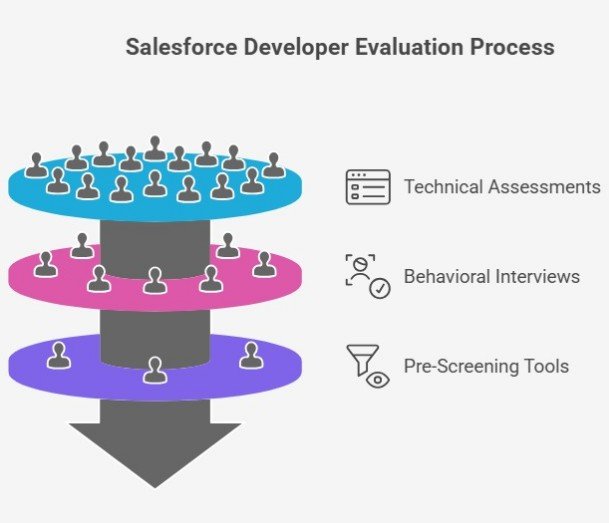
Next, pressure-test what profiles claim. Run technical assessments centered on Apex builds, LWC workflows, and API integration scenarios tied to your actual project backlog.
Pro tip: We follow this with behavioral interviews to gauge communication habits and response to delivery setbacks.
And use pre-screening tools such asiMocha orAdaface to validate baseline skills before deeper interviews consume leadership time. This layered review avoids scenarios where your candidates pass theoretical tests but lack on-the-job readiness.
The point is to surface gaps when handling change management, sprint planning pressure, or integration edge cases in live environments.
Step 6: Onboard and Set Expectations
With hiring complete, onboarding becomes the next delivery risk point. So, we advise you to:
Assign an internal mentor who understands the business context and backlog dependencies.
Set near-term KPIs tied to concrete outputs, such as the first automation release or successful system integration milestone.
Integrate the developer into sprint rituals, documentation flows, and release validation practices so changes move through structured handoffs instead of isolated builds.
Provide early access to core tools, sandboxes, and environment documentation to remove idle ramp-up delays.
This works because structured onboarding programs consistently showup to 50% higher new-hire productivity. This directly reduces the time between contract signing and measurable delivery results.
So next, let’s examine current compensation ranges across regions.
Cost of Hiring Salesforce Developers
Budget planning starts with realistic market comparisons rather than headline salary guesses. So here are the current regional cost ranges you can use to benchmark compensation and contract rates before final hiring decisions:
| Region | Annual Cost (USD) | Notes |
|---|---|---|
| North America | $100,000 – $150,000 | High skill availability, higher rates |
| Western Europe | $58,000 – $105,000 | Skilled pool, moderate costs |
| Eastern Europe (Poland, Ukraine) | $30,000 – $50,000 | Strong English skills, affordable |
| Latin America (Argentina, Brazil) | $40,000 – $80,000 | Time-zone alignment with the US |
| Asia (India, Philippines, Vietnam) | $12,000 – $40,000 | Cost-effective, fast hiring |
Based onCyntexa research, junior Salesforce developers in the U.S. usually charge around $45-$65 per hour. Meanwhile, senior developers often fall in the $80-$90 per hour range, depending on scope and delivery experience.
Pro tip: Once you benchmark rates, check out ourSalesforce contract negotiation tips to help you structure terms that protect delivery timelines and budget stability.
Common Challenges when Hiring a Salesforce Developer
Hiring usually slows down growth, not because demand is unclear, but because execution risks compound across the process. And once delivery timelines are under pressure, each staffing mistake adds months of delay.
So here are the most common challenges we’ve seen companies face when building or expanding their Salesforce teams:
Shortage of certified talent that has real delivery experience rather than surface-level platform exposure.
High salary competition as enterprise demand inflates compensation beyond many project budgets.
Long onboarding cycles, where developers require 3-6 months before reaching full productivity, can slow immediate delivery needs.
Risk of turnover disrupting project continuity, and in high-demand regions. This attrition can reachup to 40%, which can force costly re-hiring and knowledge transfer resets.
Continuous learning expectations driven by frequent Salesforce updates, where skill gaps quickly reappear if developers are not actively re-trained or supported.
As a result, teams face repeated cycles of hiring, ramp-up, partial delivery, and replacement, rather than stable forward momentum. And without process discipline or partner support, those cycles drain both budget and leadership patience.
Side note: These issues reflect broader patterns we’ve outlined across thebiggest tech recruitment challenges shaping hiring outcomes in 2025.
Now, let’s look at practical tips for selecting the right Salesforce developer from the start.
Tips to Hire the Right Salesforce Developer
From our experience, hiring success depends less on speed and more on precision. And once delivery risk is already high, each hiring choice must tighten execution rather than add uncertainty.
Here are the practical steps we advise our clients to take to avoid repeat misfires:
Prioritize certified candidates with proven projects. Look past test results alone and validate real production work tied to integrations, automation rollouts, or performance fixes.
Assess both technical and business understanding. Evaluate how candidates connect code decisions to operational impact rather than just how they solve isolated tasks.
Check adaptability to platform changes. Look for developers who actively update skills as Salesforce releases evolve rather than relying on outdated methods.
Use short trials or test projects. Observe how candidates document work, collaborate in sprint routines, and handle feedback before committing to longer engagements.
Partner with a specialized recruitment firm like Alpha Apex Group. Rely on expert screening, ecosystem knowledge, and faster shortlisting to reduce risk while protecting timelines and budgets.
Salesforce Developer Onboarding Checklist
Early onboarding typically determines whether your hire ramps smoothly or stalls delivery progress. So here are the core onboarding steps you should complete to align access, expectations, workflows, and communication from the first week forward.
Salesforce Developer Onboarding Checklist
Reset Progress 0% Complete 🎉 All onboarding steps complete! Welcome to the team! 🎉 Your progress is automatically saved.Need Help Hiring a Salesforce Developer? Let Alpha Apex Group Guide You
When your timelines are already tight, building hiring infrastructure from scratch only adds more delay. And that is where Alpha Apex Group steps in as an execution partner rather than a resume broker.
Through Alpha Apex Group, you access aSalesforce-focused recruitment firm with over 2,000 global placements and recruiters who understand real-world Apex work, Lightning development, and complex integration delivery.
As a result, hiring cycles compress instead of drag out. With an average 43-day time-to-fill, 60% faster than national hiring benchmarks, projects move forward instead of sitting in staffing limbo.
But speed alone is not the only benefit. Candidate matching focuses on developers who contribute to CRM optimization and long-term system stability rather than short-lived contract output.
And with placement options across local, remote, and nearshore teams, you gain flexibility to scale based on security needs, cost targets, and ramp-up urgency without limiting talent quality. So if delivery gaps remain tied to hiring delays or poor matches, it is time to change the approach.
Reach out to Alpha Apex Group today to start building the Salesforce team your delivery roadmap depends on.
.jpg)
.jpg)