HRIS Selection: A Complete Guide for HR Leaders in 2026
.webp)
Nearly one-third of HR leaders regret their most recent HR technology purchase, and only 29% would recommend their primary platform to a similar organization. That makes HRIS selection a high-stakes decision that affects payroll, employee data, reporting, compliance, and the employee experience.
The right Human Resources Information System should fit how your HR team works today while supporting where the business is headed next. This guide breaks down what to evaluate, what to avoid, and how to choose an HRIS with confidence.
Why You Need an HRIS
Spreadsheets and disconnected HR tools can work at 30 employees, and many experienced HR employees have been handling them for years. But with 100, 200, or 300+ people, they create duplicate records, manual payroll work, missed time-off requests, reporting gaps, and a lot more room for compliance mistakes.
So, what’s the solution?
A Human Resources Information System, or HRIS.
HRIS gives HR teams one place to manage employee data across the employee lifecycle, including payroll, benefits administration, time tracking, onboarding, performance reviews, employee records, and company policies. Cloud-based solutions can also give employees a self-service portal for routine tasks such as benefits enrollment and updating personal information.
The right system should reduce administrative work, improve employee data management, strengthen data security, and give HR managers cleaner information for workforce decisions.
And did you know that the global HRIS market was valued at $17.53 billion in 2025 and is projected to reach $37.82 billion by 2031? Small and midsize businesses are the fastest-growing buyer segment, with adoption projected to grow at a 15.76% CAGR through 2031.
If you’re trying to improve HR operations before or alongside a system change, Workforce Optimization HR Consulting can help identify the processes and workflows that need fixing first.
Key Features and Factors to Look For: How to Choose an HRIS
Choosing an HRIS starts with the workflows your team needs to improve.
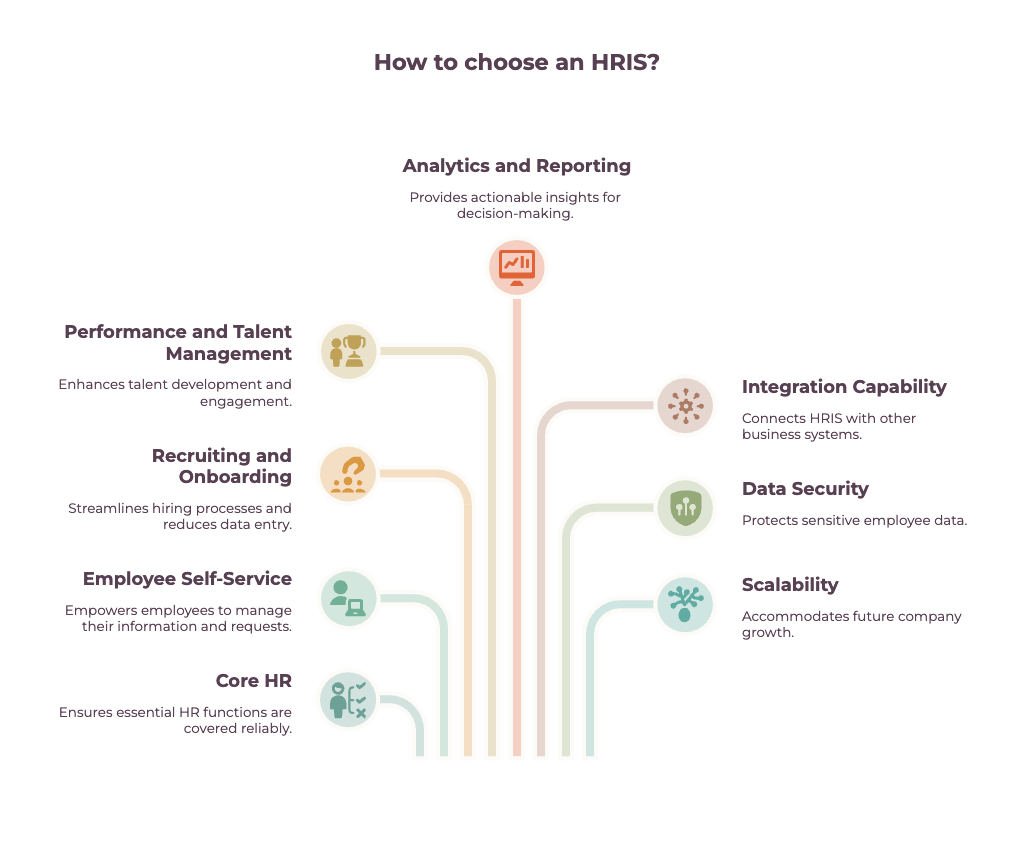
A strong HRIS should cover the essentials while leaving room to scale. Focus on these areas:
- Core HR
Look for reliable employee data management, payroll processing, benefits administration, time and attendance tracking, employee records, and time-off requests.
- Employee self-service
A good self-service portal should let employees update time-off requests, view pay stubs, access company policies, and handle routine requests without involving HR.
- Recruiting and onboarding
If hiring is a major need, evaluate recruitment/applicant tracking, background checks, position management, and the onboarding process. An integrated applicant tracking system can reduce duplicate data entry between recruiting and core HR. Our Employee Onboarding Checklist covers the workflows worth mapping before you compare platforms.
- Performance and talent management
Assess performance reviews, compensation management, learning management, goal tracking, and employee engagement features based on how your company manages talent today. Talent Management HR Consulting can help companies define these requirements before selecting technology.
- Analytics and reporting
Reporting is one of the most common areas where HR software selection goes wrong. More than 50% of buyer questions at one industry benchmarking event centered on reporting, insights, and analytics rather than basic payroll or benefits functions. Look for usable dashboards, configurable reports, and HR metrics that decision-makers can actually act on.
- Integration capability
Your HRIS needs to connect cleanly with payroll systems, finance software, HR tools, and other business applications. Open APIs and pre-built connectors can reduce long-term integration costs.
- Data security
Review security features, role-based permissions, role-based access controls, audit trails, and support for requirements such as the General Data Protection Regulation where applicable.
- Scalability
A system that works for 200 employees may become restrictive at 1,000, especially if you add new locations, payroll requirements, or business units.
Employee experience is part of the equation, too. Slow workflows, poor mobile access, and confusing interfaces can undermine adoption even when the system is strong on paper. Our guide to the top employee experience consulting firms offers additional context on how technology fits into the broader employee experience.
The best way to choose an HRIS is to start with requirements, then score every platform against the same business, technical, and employee needs.
Red Flags to Avoid When Selecting an HRIS
Most HRIS mistakes happen before implementation starts.
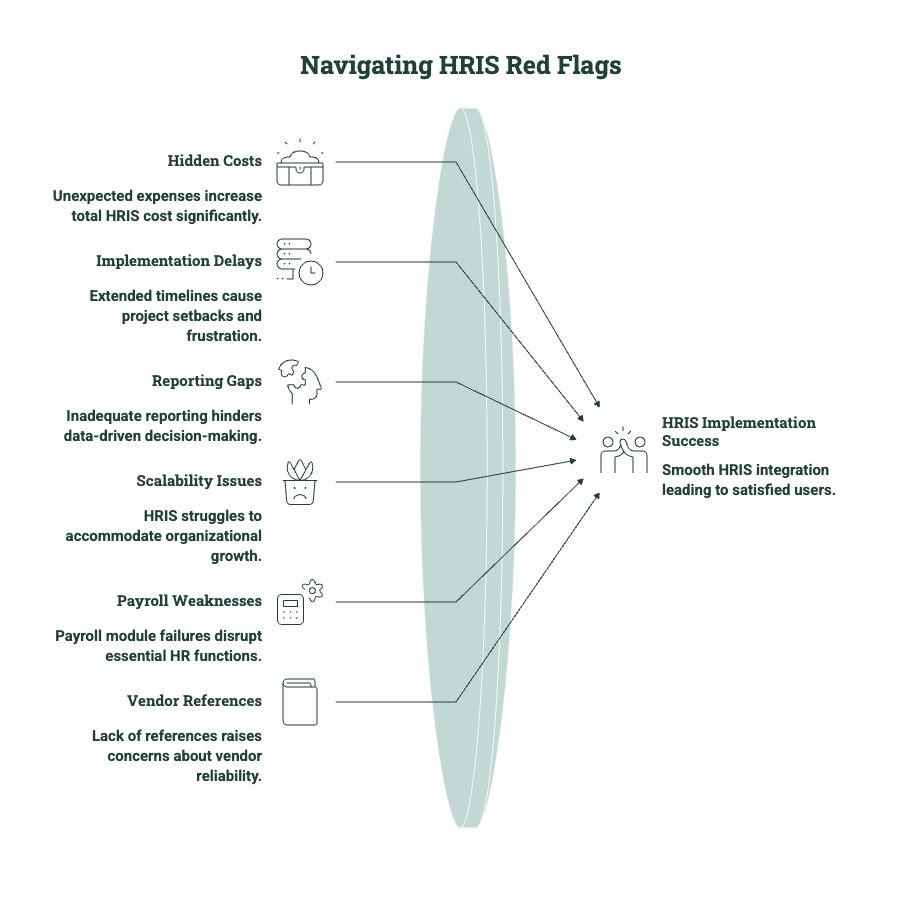
The wrong assumptions during vendor selection can lead to years of higher costs, manual work, and frustrated users. Watch for these red flags:
Hidden Costs
A low license fee does not always mean a low total cost. Implementation, integrations, data migration, training, support, and ongoing administration can materially increase what you spend.
Ask vendors to break down one-time and recurring costs before you compare proposals. In SHRM research, 46% of HR leaders reported hidden costs after signing their HR technology contract.
Unrealistic Timelines
Be cautious if implementation sounds unusually fast or simple. Another 26% of HR leaders said implementation took longer than expected.
Before signing, confirm who owns each stage, which internal resources are required, and how long data migration, integrations, testing, and training will take. The timeline should also account for delays caused by incomplete data or limited team availability.
Weak Reporting
Reporting should be tested before you buy, not treated as something to configure later. In the 2025-2026 HR Systems Survey, 40% of buyers cited reporting functionality as a major gap.
Ask the vendor to build reports using the actual HR metrics your team tracks. Check how easily users can filter data, customize dashboards, schedule reports, and export information without vendor support.
Limited Scalability
An HRIS that fits your current headcount may become restrictive as the organization grows. Review how the system handles new locations, larger teams, more complex permissions, and additional payroll requirements.
You should also check how pricing changes at higher employee counts and whether important capabilities require new modules or integrations. Otherwise, early savings can lead to an expensive replacement later.
Payroll and Time Tracking
Payroll and time tracking deserve more scrutiny than a standard sales demo. According to SHRM, 45% of organizations plan to replace their time and attendance system within 12 to 24 months, while 36% expect to replace payroll within two years.
Test the rules and exceptions your team handles regularly, including overtime, leave, multiple locations, corrections, and payroll approvals. A system may perform well in a scripted demo but still create significant manual work in everyday use.
Customer References
A vendor should be able to connect you with customers whose needs resemble yours. Ask for references from organizations close to your size, industry, geography, and operational complexity.
Use those conversations to find out how long implementation took, which features employees use, and where the system still creates manual work. If the vendor only offers references from much larger or simpler organizations, their experience may not reflect yours.
As SHRM Lead HR Technology Analyst Kenny Pyle puts it:
“The total cost of ownership is going to be three times the sticker price. Budget for that.”
For some smaller companies, these red flags may point to a bigger question: whether they are ready to own and manage a full HRIS at all. In that case, comparing a platform purchase with the top PEO companies can help you figure out the better operating model.
HRIS Selection Checklist: Key Steps for Making the Right Decision
A strong HRIS selection process should narrow the field before vendors start selling. Use this checklist to keep the decision tied to business needs instead of demos, brand names, or feature overload.
- Document your current pain points.
Map where HR teams lose time today. That could be payroll corrections, duplicate employee data, manual time tracking, weak reporting, disconnected applicant tracking, or slow onboarding.
- Define future requirements.
Build requirements around where the business will be in three to five years. Include expected headcount, locations, payroll complexity, integrations, reporting needs, performance and talent management, and data security.
- Create a cross-functional buying team.
HR should lead the process, but IT, Finance, Payroll, and other key stakeholders should help evaluate integration capability, security protocols, costs, and operational impact.
- Shortlist three or four vendors.
Focus on platforms that fit your company size, industry, and complexity. Brand recognition alone is a weak basis for HRIS vendor selection. For companies that need outside support, our guide to the top HR technology consulting firms and advisors can help identify experienced partners.
- Run structured demos.
Give every vendor the same scenarios to demonstrate, from benefits enrollment and time-off requests to analytics, payroll processing, and employee self-service. Score each platform against the same criteria.
- Model total cost of ownership.
Only 25% of HR leaders surveyed by SHRM said their primary HR technology platform was ultimately worth the cost.
- Test before committing.
Use a sandbox, pilot, or proof of concept where possible. This is especially important when replacing a legacy HR information system or moving to a cloud-based HRIS.
Always start with the requirements. SHRM found that organizations use only about 75% of the HR technology functionality they purchase, while just 62% of employees actively use the systems implemented for them.
When you’re deciding on an HRIS system, the goal is to choose the one that solves the right problems, fits your operating model, and will still work as the company grows.
If you want to learn more, the following YouTube video takes a look at choosing HR software:
HRIS Vendor Selection: Examples, Pros, and Cons
There is no single “best” HRIS. The right choice depends on company size, workforce complexity, payroll needs, integrations, and how much functionality you actually plan to use. Large enterprises still account for 68.45% of HRIS market revenue, according to Mordor Intelligence, but small and midsize adoption is growing quickly.
Here are five platforms worth considering during HRIS vendor selection:
1. Workday
Best fit: Large and global organizations with complex HR operations.
Workday HCM covers core HR, workforce management, recruiting, talent, learning, benefits, and analytics in one cloud-based system. Its size makes it a good fit for companies that are managing complex organizational structures, large employee populations, and extensive human capital management requirements.
Potential tradeoff: That depth can be more than smaller companies need. Organizations with straightforward payroll and core HR requirements should weigh the value of Workday’s broader capabilities against implementation effort and ongoing administration.
2. UKG Pro
Best fit: Large employers with complex payroll, scheduling, and frontline workforce requirements.
UKG Pro combines HR, payroll, talent management, time and attendance, scheduling, workforce planning, compliance, and reporting. Its workforce management capabilities make it relevant for industries such as healthcare, retail, and manufacturing, where scheduling and time tracking can become complicated.
Potential tradeoff: Smaller and midsize organizations may find UKG Ready more appropriate. UKG itself positions Ready for growing businesses and Pro for larger enterprises with more advanced requirements.
3. Rippling
Best fit: Growing companies that want HR, payroll, IT, and finance workflows connected.
Rippling takes a broader approach than a traditional human resource information system. Its platform combines HRIS functionality with payroll, recruiting, benefits, performance management, learning, device management, identity access, and finance tools. Employee data can trigger workflows across those functions, which can reduce manual handoffs during onboarding, offboarding, and role changes.
Potential tradeoff: Companies looking only for a basic HRIS may not need Rippling’s broader IT and finance ecosystem. Its strongest value proposition comes from connecting multiple functions on the same platform.
4. HiBob
Best fit: Growing and midmarket organizations focused on usability and employee experience.
HiBob’s Bob platform includes core HR, time and attendance, onboarding, hiring, performance, learning, compensation, payroll capabilities, and workforce planning. Employees can also manage common tasks such as time-off requests through the platform and mobile app.
Potential tradeoff: Companies with highly complex global payroll or enterprise-scale workforce management requirements should test those needs carefully during demos rather than assuming every module has the same depth as dedicated enterprise systems.
5. isolved
Best fit: Small and midsize employers that want HR and payroll in one system.
isolved People Cloud brings together payroll, benefits administration, applicant tracking, onboarding, employee self-service, time tracking, talent management, compliance, and reporting. Its connected payroll and HR model can be useful for lean HR teams that want to replace several disconnected systems with one platform.
Potential tradeoff: Organizations with highly complex multinational or enterprise requirements should compare its global capabilities, integrations, and analytics needs carefully against larger enterprise platforms.
Selecting the software is only part of the decision. Implementation quality, data migration, system configuration, integrations, and change management can determine whether the platform works as intended.
Our guide to the top HRIS consulting firms and implementation consultants can help companies compare implementation support, while the top human capital management consulting firms covers broader HR transformation partners.
The strongest HRIS vendor selection process starts with your requirements and then finds the platform that meets them.
Make HRIS Selection Easier With Alpha Apex Group
As we learned at the beginning, nearly one-third of HR leaders regret their most recent HR technology purchase. A weak HRIS selection process can lock a company into the wrong platform, costly integrations, poor reporting, and years of workarounds.
Alpha Apex Group helps companies make the decision before vendor demos start. Our HRIS consulting services can support requirements gathering, vendor evaluation, HRIS selection checklists, implementation planning, data migration, and broader HR technology decisions.
Because our approach is platform-neutral, recommendations are based on your workforce, processes, growth plans, and existing systems rather than a preferred vendor.
Chat with Alpha Apex Group to build a clearer HRIS selection process and choose a system that fits how your business actually operates.
FAQs: HRIS Selection
How is MES different from SCADA or PLC controls?
PLCs control machines, while SCADA monitors equipment and process conditions. MES sits above both, managing work orders, production status, quality, traceability, and performance across the plant.
Can MES be implemented before ERP is finished?
Yes, MES can be implemented before ERP is finished, but the integration model should be defined first. Manufacturers need clear ownership for master data, work orders, inventory, production reporting, and system interfaces before connecting MES and ERP.
What security standards should an MES vendor support?
Your MES vendor should support IEC 62443 alignment, role-based access controls, encryption, audit logs, secure APIs, patching processes, and network segmentation support. Regulated manufacturers may also need validation and electronic-record controls.
How do MES requirements change in regulated industries?
When choosing an MES, regulated manufacturers typically need stronger batch genealogy, electronic records, audit trails, document control, validation, and quality workflows. Process manufacturers should also evaluate recipe management and material traceability. Our guide to chemical manufacturing ERP software covers related system requirements.
Does Alpha Apex Group build custom MES integrations?
Yes. Alpha Apex Group can design integrations between MES, ERP, quality systems, PLM, warehouse systems, and plant-floor technology instead of relying only on standard vendor connectors.
How does Alpha Apex Group connect MES with SAP or NetSuite?
We map the transactions that must move between systems, such as work orders, inventory, production confirmations, quality data, and finished goods, then design the appropriate API, middleware, or custom integration layer. For NetSuite environments, clean data structure and migration planning are especially important.
What does an MES readiness assessment include?
Your MES readiness assessment should cover current production workflows, system architecture, data quality, integration gaps, plant-floor connectivity, reporting needs, compliance requirements, and user adoption risks. The result should be a clear list of what must change before platform selection or implementation begins.
.jpg)

.jpg)

.jpg)